
Your thoughts, organized on your iPhone
Catch it before it gets away.
Speak it, snap it, sketch it, or type it. CatchDo turns what you catch into tidy notes and to-do lists, sorted by topic, with AI that runs entirely on your iPhone.
One email when CatchDo is available for iPhone. No marketing emails.
- AI runs on your phone
- Works offline
- No app account needed
How it works
From caught
to done.
Follow one note through the app. These are real screenshots of CatchDo for iPhone, filled with a small demo library of notes we wrote for them.
-
01 · Catch
Say it before it's gone.
Tap the capture button and talk. CatchDo writes the words down as you speak and keeps the recording with them. Hold the button instead to type, take a photo or video, or draw.
- Voice
- Text
- Photo
- Video
- Draw
- Live transcription with speaker labels, made on your iPhone
- While you talk, a running summary keeps the key points and the questions asked, with who asked them (on iPhones with Apple Intelligence)
- Start a note from a widget, the Lock Screen, or the Dynamic Island
- Share text, links, photos, and voice memos in from any app
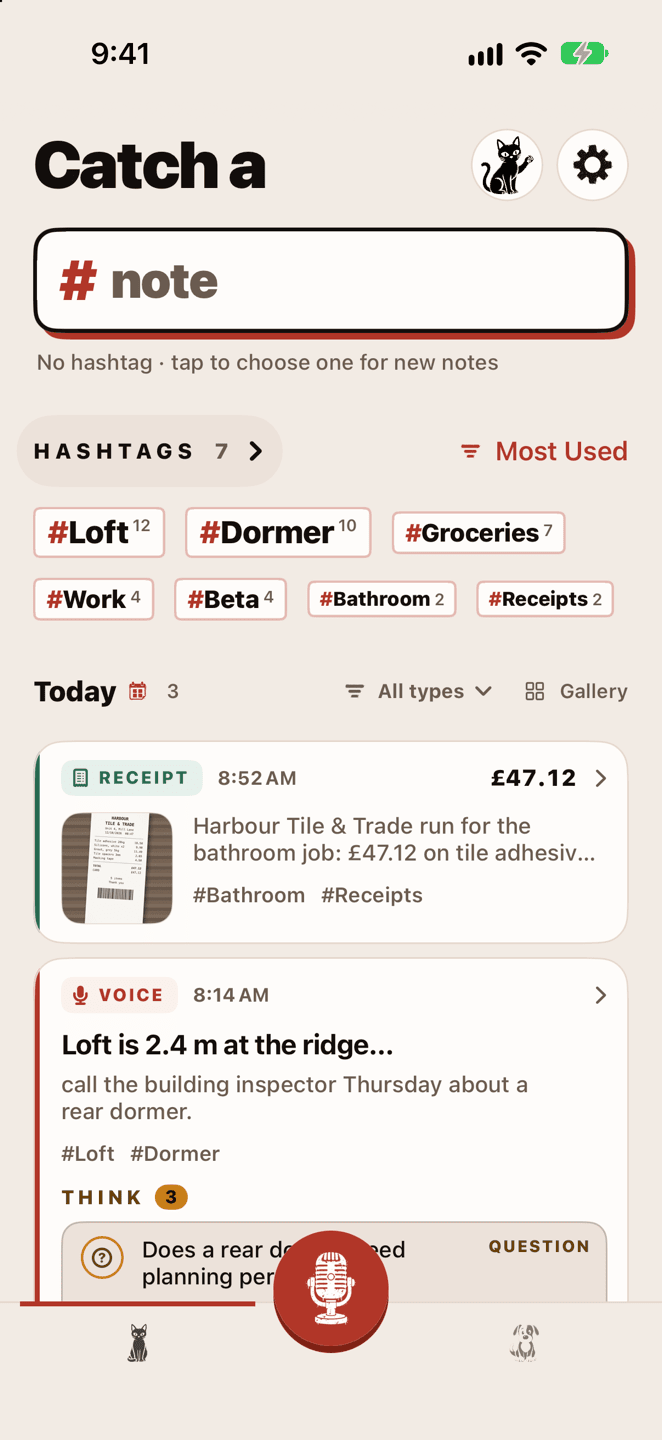
Catch: today's notes and your hashtags. -
02 · Sort
It sorts itself out.
Each note comes back with a title, a hashtag to file it under, and a tidy page of what you caught, all written on your iPhone. The recording, photo, or sketch stays with it.
- Meetings split by speaker, lectures laid out by section, receipts added up
- More hashtags wait beside it: tap one to add it, and change the title or the page whenever you like
- Search everything you've caught, words in photos and sketches included
- Share the whole note, its summary, or its to-do list as text or as story-sized pictures
Free reads your first 15 notes with AI. Premium reads every note.
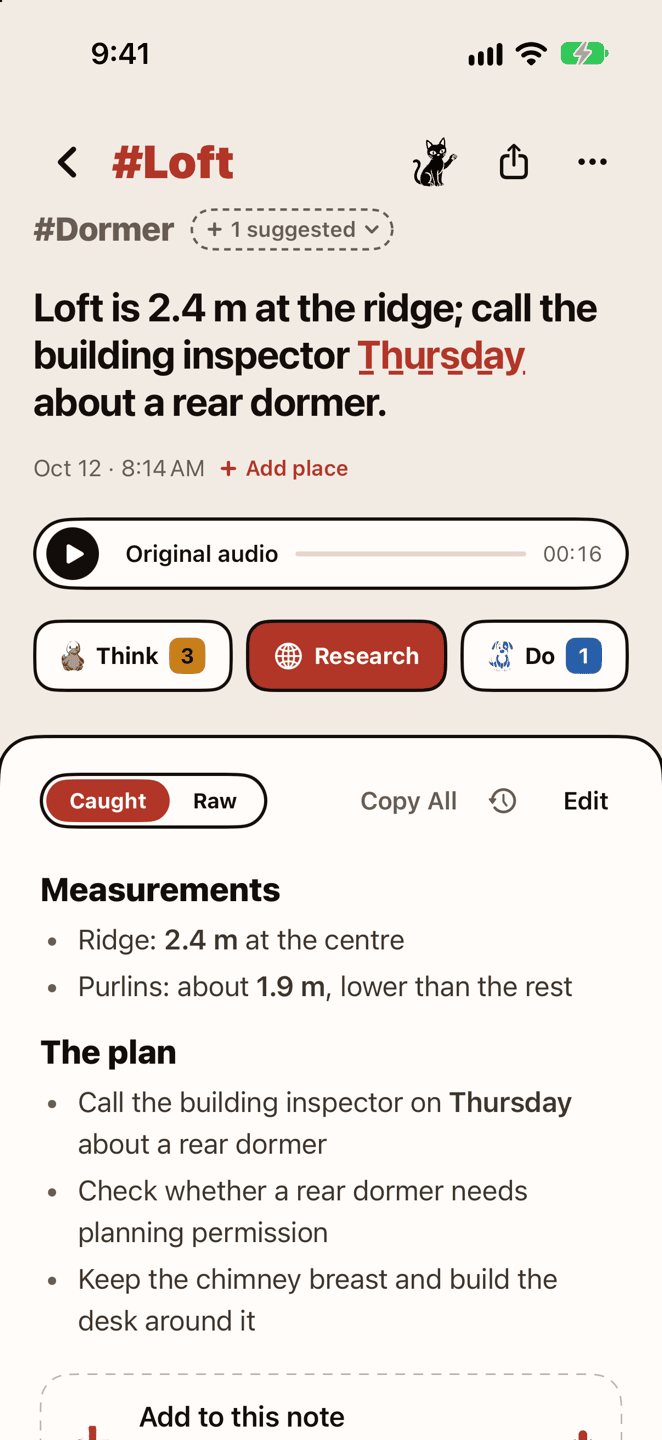
A voice note, filed under #Loft. -
03 · Think
Keep the thoughts worth keeping.
Tap Think on a note and CatchDo picks out its ideas, questions, and decisions. Keep the ones you want, and they gather on the hashtag's page with everything else on that topic.
- Go through a topic's open questions one card at a time: answer, decide, or skip, and settled ones move to a Resolved shelf
- Tap Research to turn a note or a topic into a brief, say what you want back — compare options, plan a trip, or a request of your own — and open it in Google, ChatGPT, or Claude
- Paste the answer back to settle your open questions, one by one
- Tap the cat on Catch or the dog on Do to ask your notes anything (Premium)
Free shows the first thought and the first to-do each reading finds. Premium shows them all.
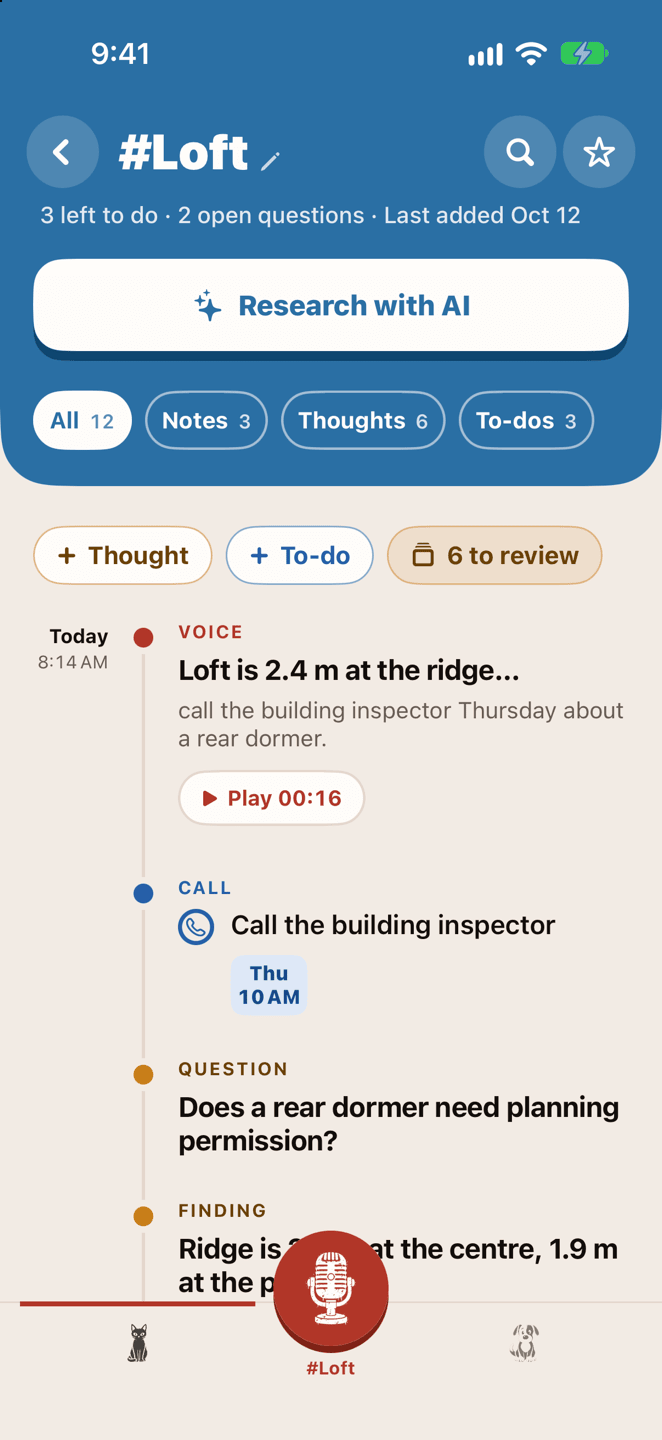
Everything about #Loft on one page. -
04 · Do
Then get it done.
Tap Do on a note and CatchDo finds its tasks and their dates: things to buy, calls to make, steps to follow. Check them over, and they land on the Do tab, each one linked to the note it came from. Pick a kind to see just the calls, or just the shopping.
- Ask for just the shopping list, the steps, or what to pack, and pick from lists the note could make (Premium)
- Plan the week in the Planner, with reminders when you want them
- Dated to-dos can sync to your calendar and stay up to date as you edit them
- Send to-dos to Things, Todoist, Reminders, and more
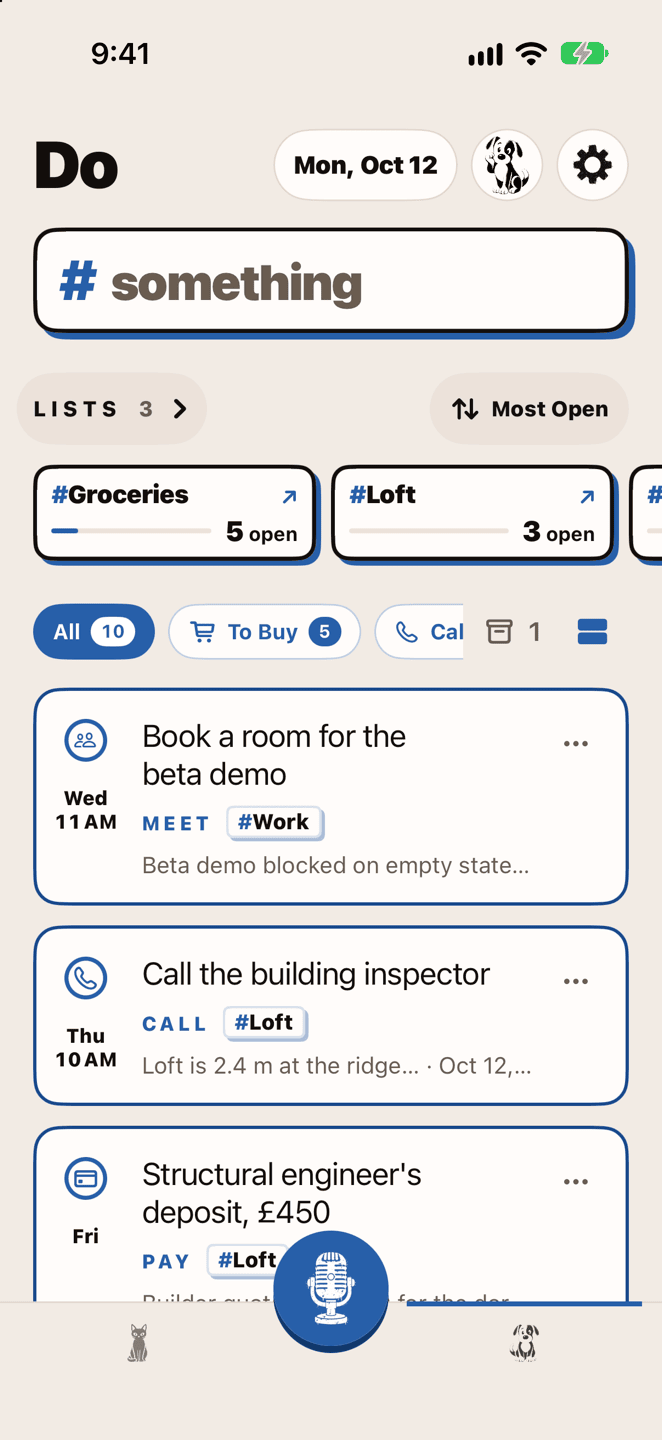
Do: your lists, by kind and by date.
Private by design
Your notes stay
on your iPhone.
CatchDo does its work on your device. There's no account to make, and nothing you catch is uploaded on its own.
- Transcription
- On device
- Summaries and hashtags
- On device
- Search and chat
- On device
- Account needed
- No
- Signal needed to catch
- No
The speech and AI models download once, when you first use them. iCloud sync, a web page you attach to a note, and a research brief you send need a connection.
-
No account
No sign-up and no sign-in. Open CatchDo and start catching.
-
AI on your iPhone
Transcription, summaries, hashtags, and chat run on the device, with Apple Intelligence or, on iPhones without it, Google's open Gemma model. Nothing you catch is uploaded on its own, to us or to any AI provider.
-
Works offline
Once the models are on your phone, you can catch and organize on a plane, underground, or abroad.
-
Your own iCloud
Notes sync between your devices through your private iCloud, never through us. Switch it off any time.
-
You choose what leaves
A web page is fetched only when you attach it to a note, never because you typed its address. A research brief or a feedback report goes out only when you send it.
-
No ads, no tracking
Usage counts and crash reports are anonymous and never carry your notes. Turn them off on any plan; in the EEA and the UK they start off.
Free and Premium
Free to start.
Premium for more.
Keep as many notes and to-dos as you like on the free plan. Premium is for long recordings and AI on every note.
-
Free
Catching, keeping, and searching your notes stay free.
- Voice, photo, video, drawing, and text notes
- Unlimited notes, to-dos, and hashtags
- Live transcription with speaker labels
- Voice recordings up to 3 minutes
- Your first 15 notes read in full by the on-device AI
- The first thought and the first to-do each reading finds
- Checklists, the Planner, and calendar sync
- iCloud sync and research briefs
No account and no card needed.
-
Premium
One upgrade unlocks everything. All processing stays on your iPhone.
- Today Everything unlocks
- Unlimited recording
- AI on every note, plus chat, questions about a note, rewrites, and translation
- Every thought and to-do a reading finds, not just the first
- Live meeting updates as you record, on iPhones with Apple Intelligence
- Full research: the brief's goal and context written for you, and long answers read in full
- Best-quality transcription for accents and mixed-language notes, on iPhones that can run it
- Every list style: bullet lists, schedules, counters, kanban boards, and flashcards
- Two days before it ends A reminder A notification, if you allow them.
- When the trial ends Billing starts Cancel before then in Settings and pay nothing.
Weekly or yearly, with a free trial for eligible new subscribers, or a one-time lifetime unlock. Billed through the App Store.
-
FAQ
A few things you might ask.

Does it work offline?
Yes. Once the speech and AI models are on your phone, catching, transcribing, organizing, and searching all work without a connection. iCloud sync waits until you're back online. Reading a web page you attach to a note and sending a research brief need a connection.
Does my iPhone need Apple Intelligence?
No. CatchDo runs on any iPhone with iOS 26. Where Apple Intelligence is on, it reads your notes with Apple's on-device model. On iPhones that can't run Apple Intelligence, it offers Google's open Gemma 4 model instead, a one-time download that's free on every plan, and reads your notes with that, still on the phone. The welcome tour suggests the setup that suits your iPhone and your language. The running summary while you record needs Apple Intelligence.
Who can read my notes?
You. CatchDo processes your notes on your iPhone. We don't receive them, and we don't use them to train AI. Sync goes through your Apple Account's private iCloud. If you share a note or send a research brief, you choose what's in it first.
What gets sent to Google, ChatGPT, or Claude?
Only the brief you choose to send, after you've read it word for word. Google gets a short search line; ChatGPT and Claude get the brief as you left it — your question, the background, and the open questions and to-dos you kept. Nothing goes in the background, and once it arrives, that company's privacy policy applies.
Do I need a ChatGPT or Claude account?
No. Use the account you already have, including a free plan, or search Google instead. Building a brief and bringing the answer back are free. Premium writes the brief's goal and context for you and reads long answers more fully.
How accurate is the transcription?
Clear speech gives the best results; background noise and overlapping voices can reduce accuracy. The free plan uses a fast on-device speech model. Premium adds the larger Best quality model, on iPhones that can run it. Speaker labels help tell voices apart, and the original audio stays with the transcript so you can check it.
Can I use it in my language?
Yes. CatchDo is available in 12 languages, and it writes summaries, to-dos, and hashtags in the language you choose. For transcription, the free Save space setup uses iOS's own speech recognition, one language per recording. Premium's Best quality model handles 90+ languages, even mixed in one recording.
Does it sync between my devices?
Yes. Optional iCloud sync keeps notes, checklists, and audio in your Apple Account's private database. You can keep catching while offline; changes sync when you're connected again. Turn sync off at any time in Settings.

Coming to iPhone
Make room for your next good idea.
CatchDo is coming to iPhone. Join the waitlist and we'll email you when it's ready.
One email when CatchDo is available for iPhone. No marketing emails.
Coming to the App Store